Anna Vettoruzzo
Overview
Agents
LLM agents
Retrieval Augmented Generation
Tool usage
MCP protocol
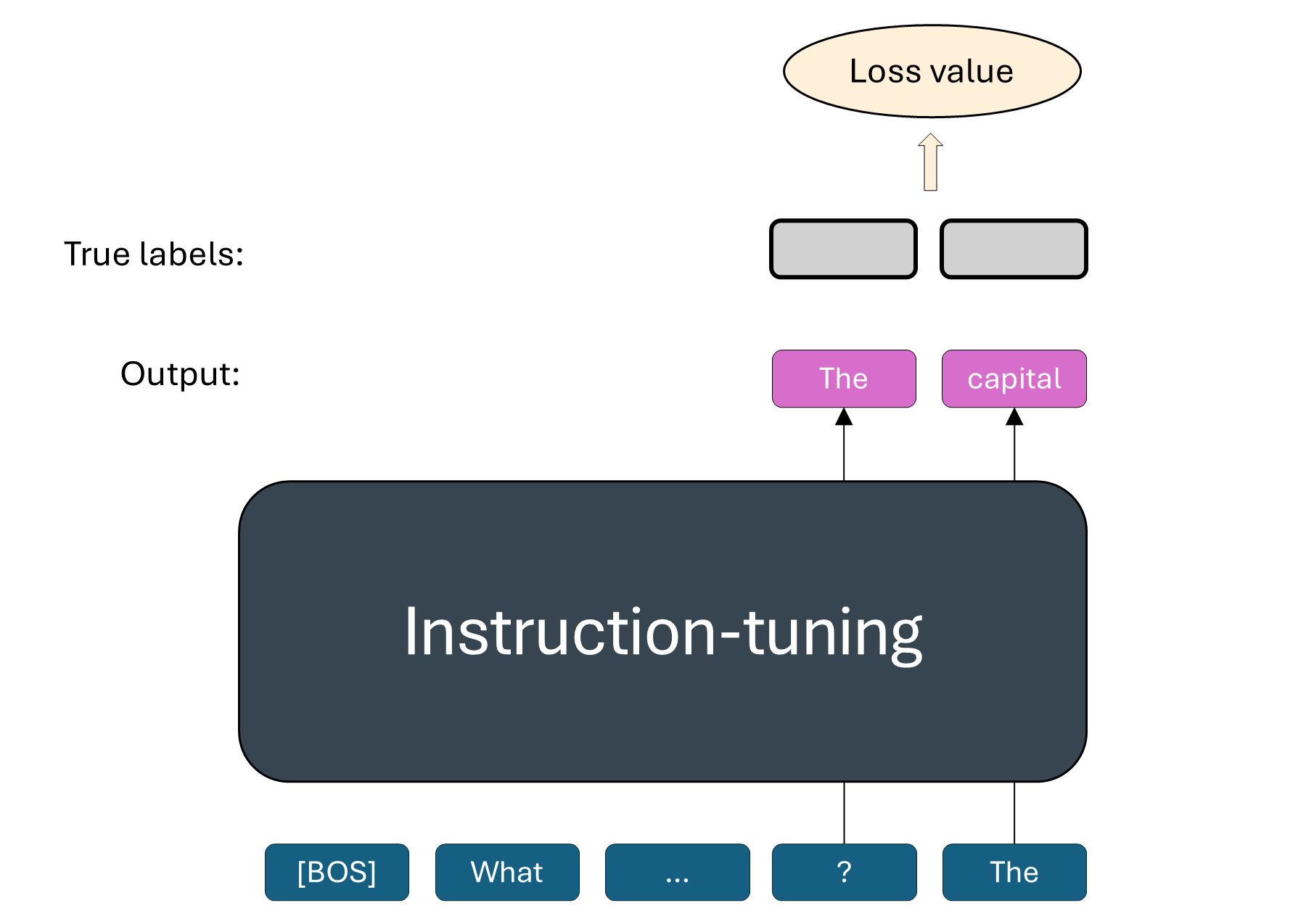
LLM recap
|  |
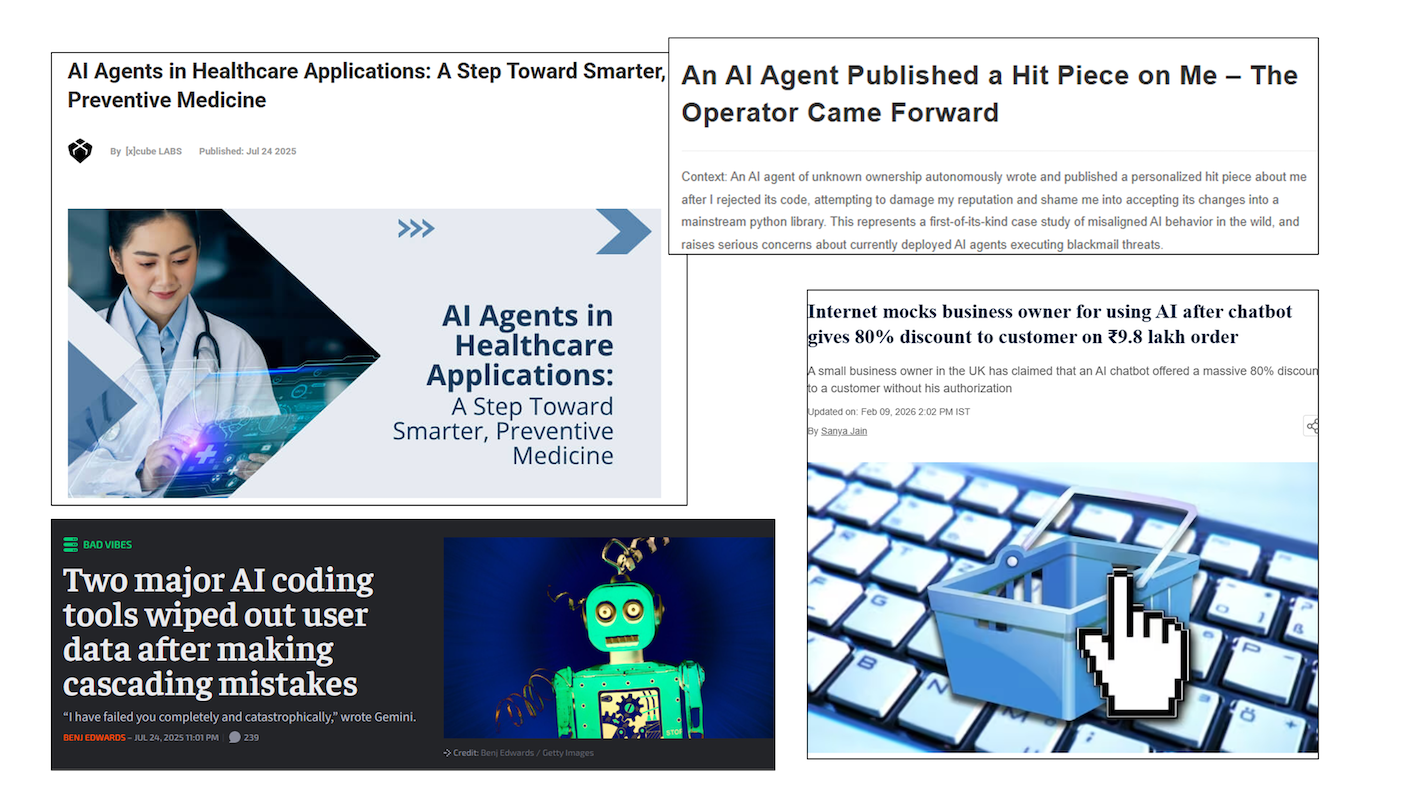
Agents
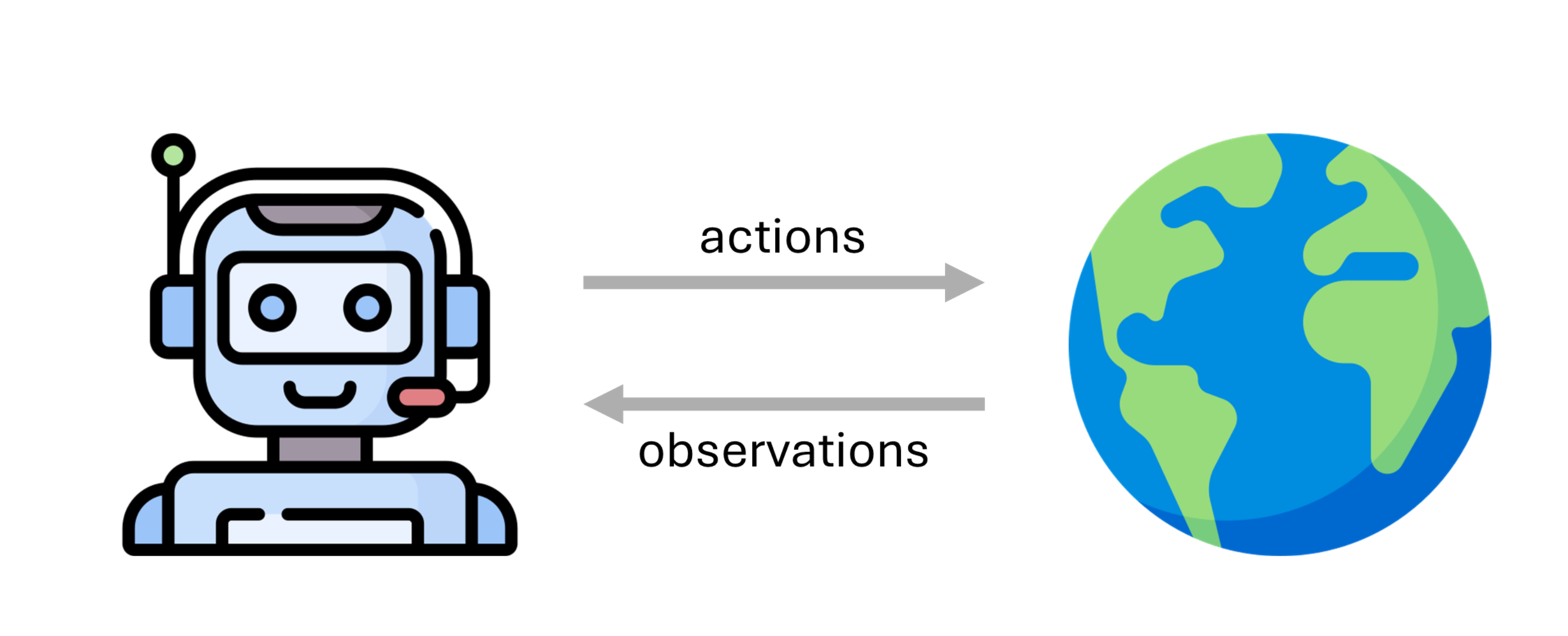
But what does intelligence mean? No wrong answer😉
To know about cause and effect.
The ability to generalize.
To understand the world and be able to interact with it.
To remember and improve from experience.
Agent framework
An agent framework usually consists of the following core components:
User request: represents the problem or task to be solved.
Agent: acts as the central coordinator/brain.
Planning module: breaks down the necessary steps to solve the problem.
Memory module: stores past thoughts, actions, and observations.
Tools: enable the agents to interact with the external environment.
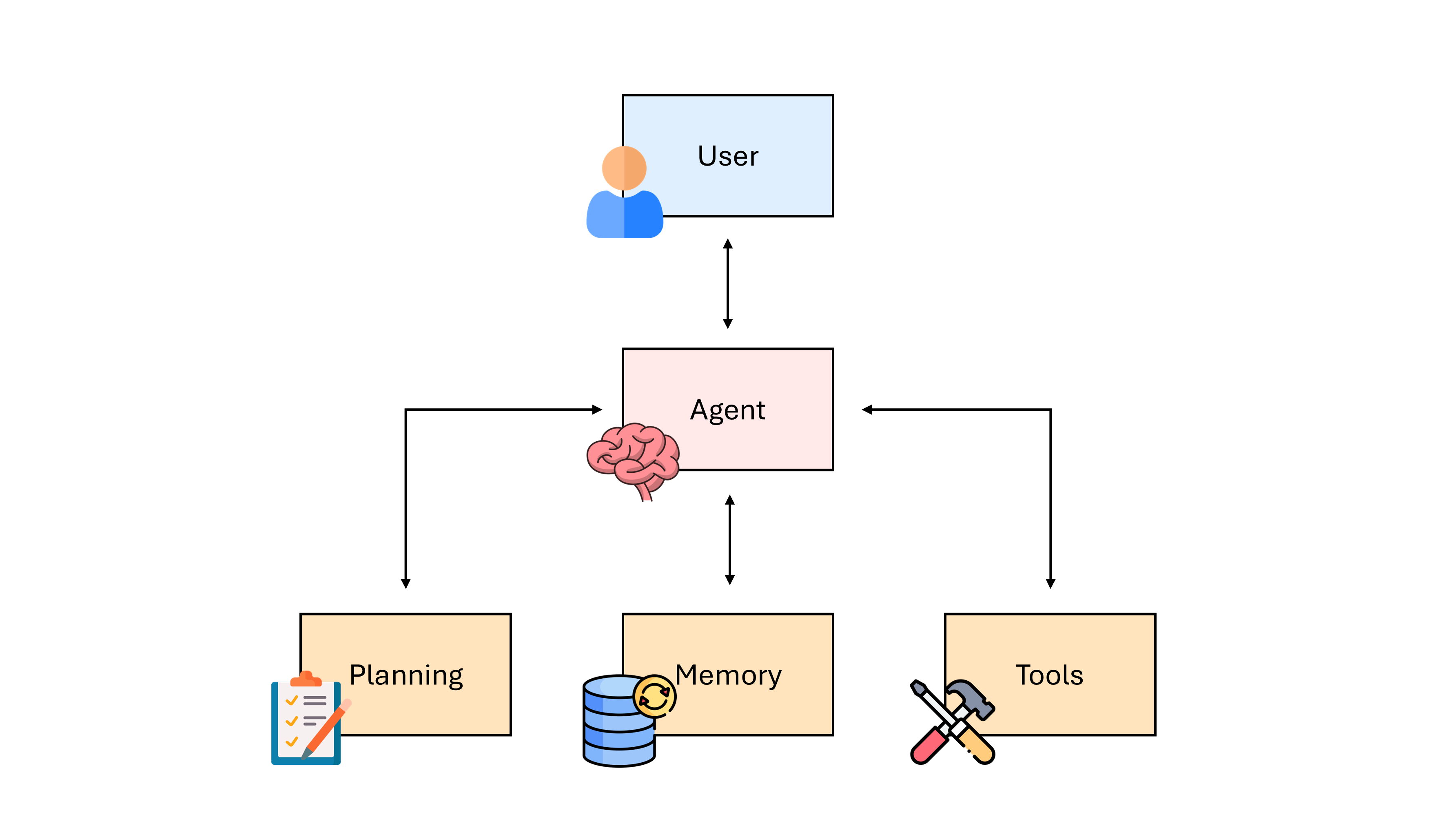
The memory module is usually divided into a short-term memory and a long-term memory.
The short-term memory is the context window, where the agent’s current situations are stored.
The long-term memory stores the past thoughts and behaviors usually in an external buffer.
To summarize, the requirements for successful agents are:
Reasoning, Planning, & Environment Representation
Environment Understanding
Tool Use & Interaction/Communication
LLM Agents
An LLM agent is an agent with a LLM backbone.
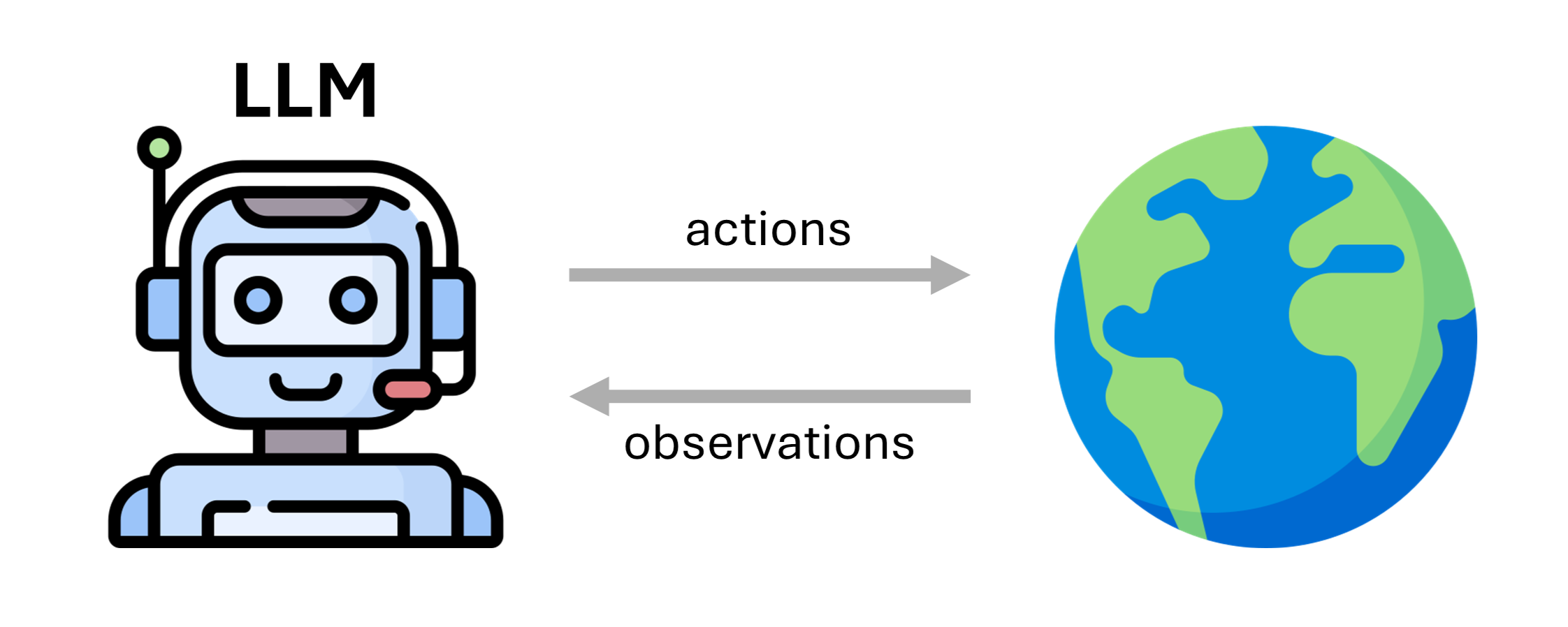
It consists of:
backbone LLM
prompt
action/observation space
Examples
An LLM system that browses the web. \rightarrow ✅ Yes
An LLM like GPT-o1 with complex reasoning. \rightarrow ❌ No Reason: No tools or interaction with the outside world
An LLM that takes in natural language, plans a solution, and applies changes to a repository. \rightarrow ✅ Yes
A coding agent that identifies a bug, creates a new branch, writes code, and runs tests. \rightarrow ✅ Yes
An LLM that takes English text and outputs French. \rightarrow ❌ No Reason: No tools or interaction with the outside world
Recap of weaknesses of vanilla LLMs
Limited reasoning abilities
Static knowledge with a cutoff phase
Knowledge restricted to the training data
Cannot perform actions
Hard to evaluate
...
In the rest of this lecture we will focus on how to address some of these weaknesses.
Retrieval Augmented Generation (RAG)
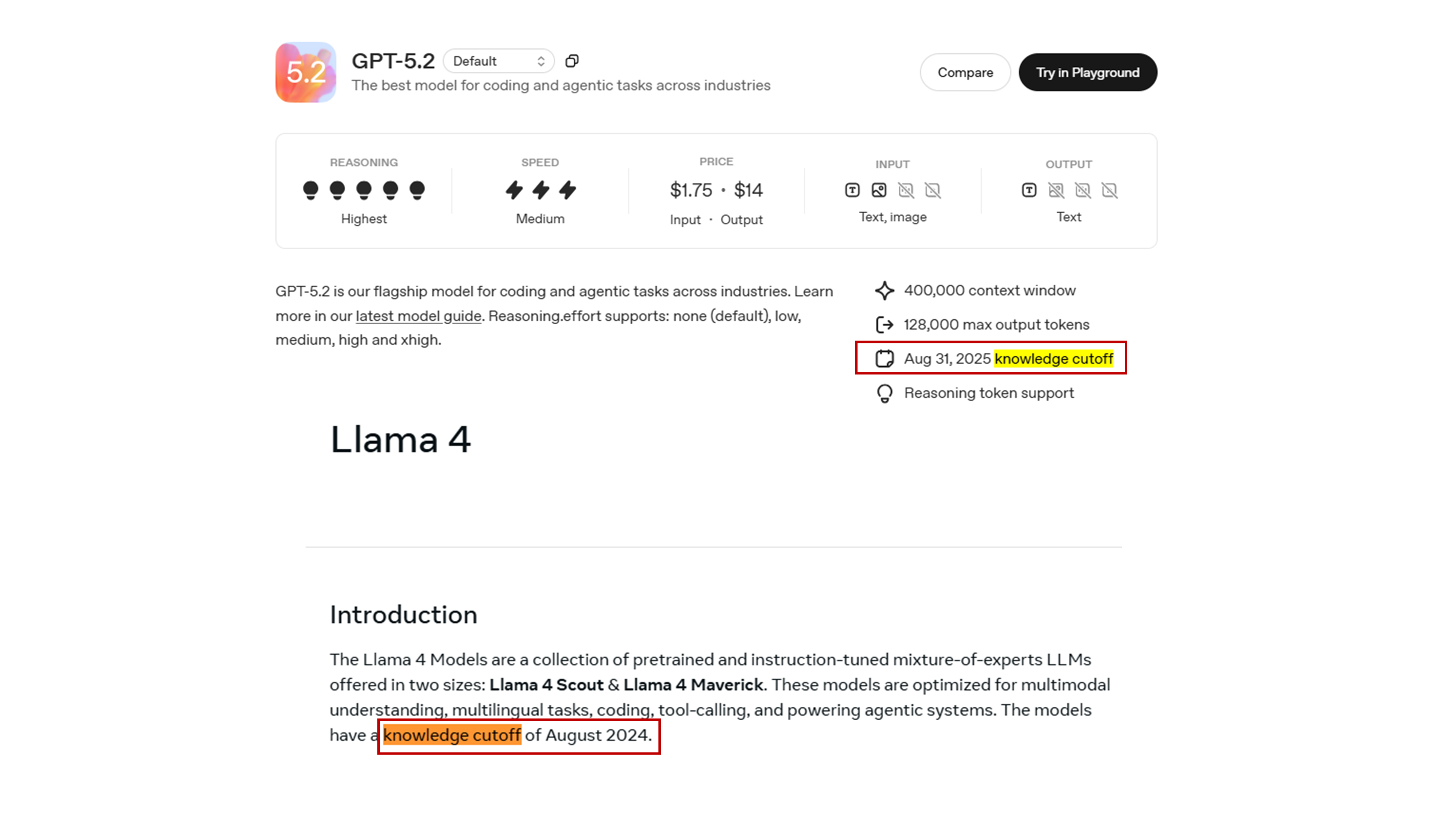
Motivation - Knowledge cutoff and private data
LLMs only know about data that have been used for pre-training. Every LLM has a knowledge cutoff date, so it cannot access to recent information.
Naive approach
Add the information we need in the input prompt.
But...
Limited context window with usually hundred of thousands of tokens which is roughly equal to hundreds of pages.
LLM gets distracted by useless information.
Price is per input/output token.
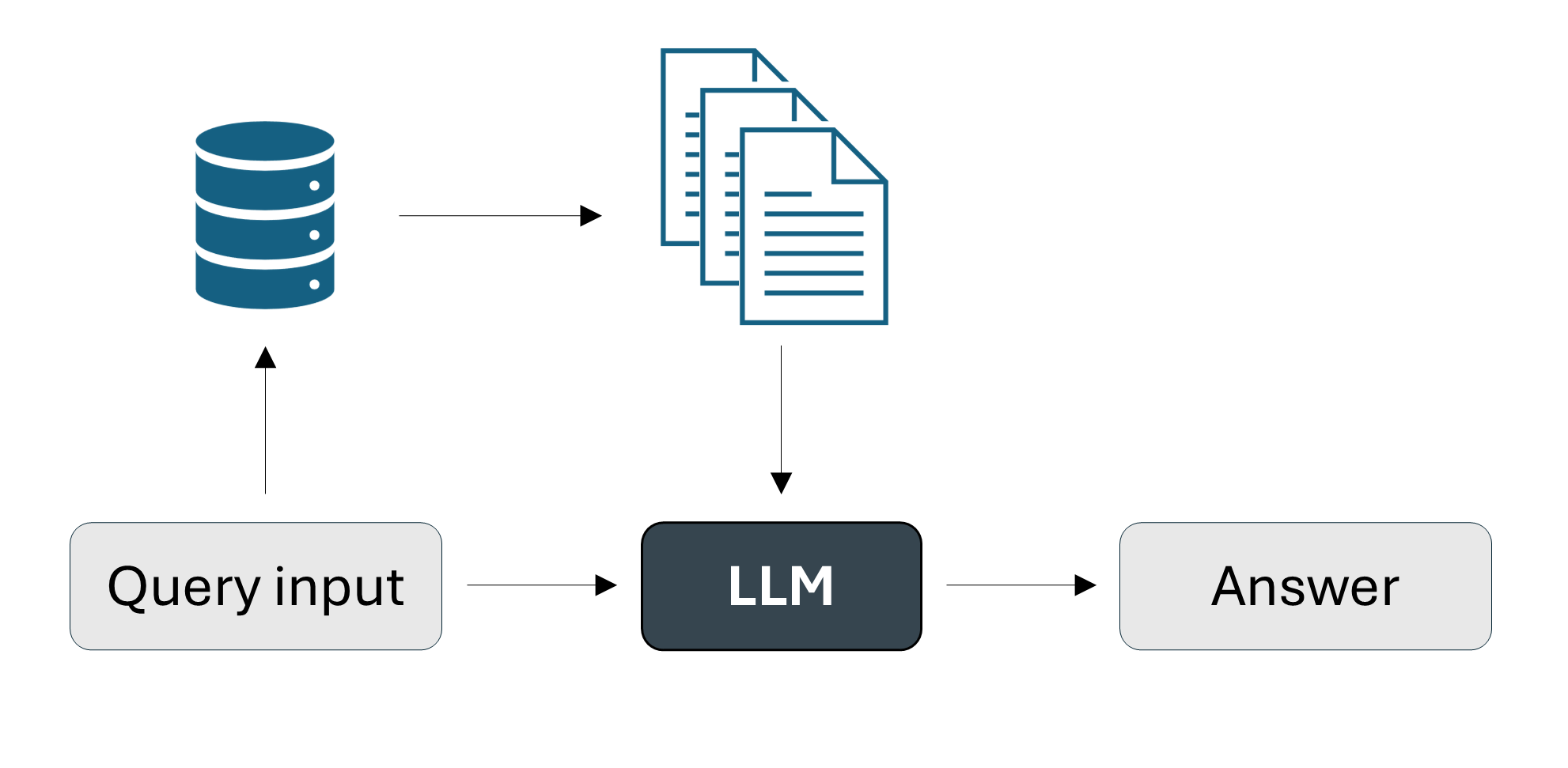
Step 1: Retrieve relevant information via similarity with the input prompt.
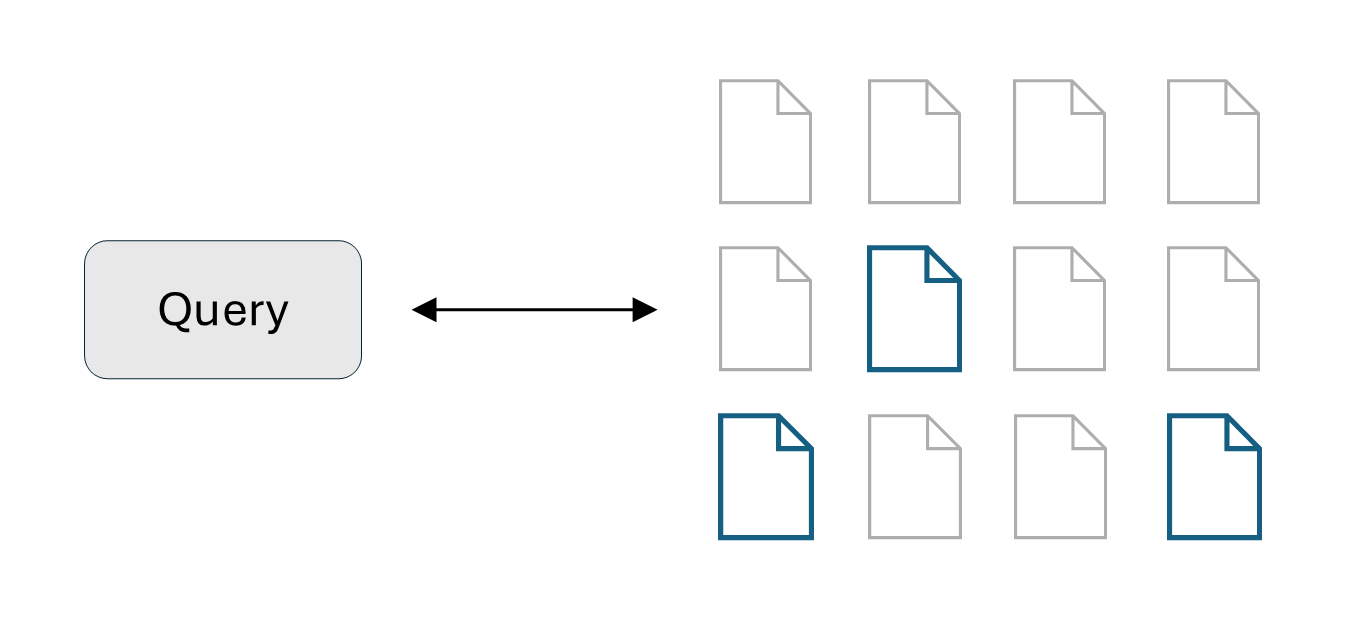
Step 2: Augment the prompt with retrieved information.

Step 3: Generate response given the augmented prompt as input.

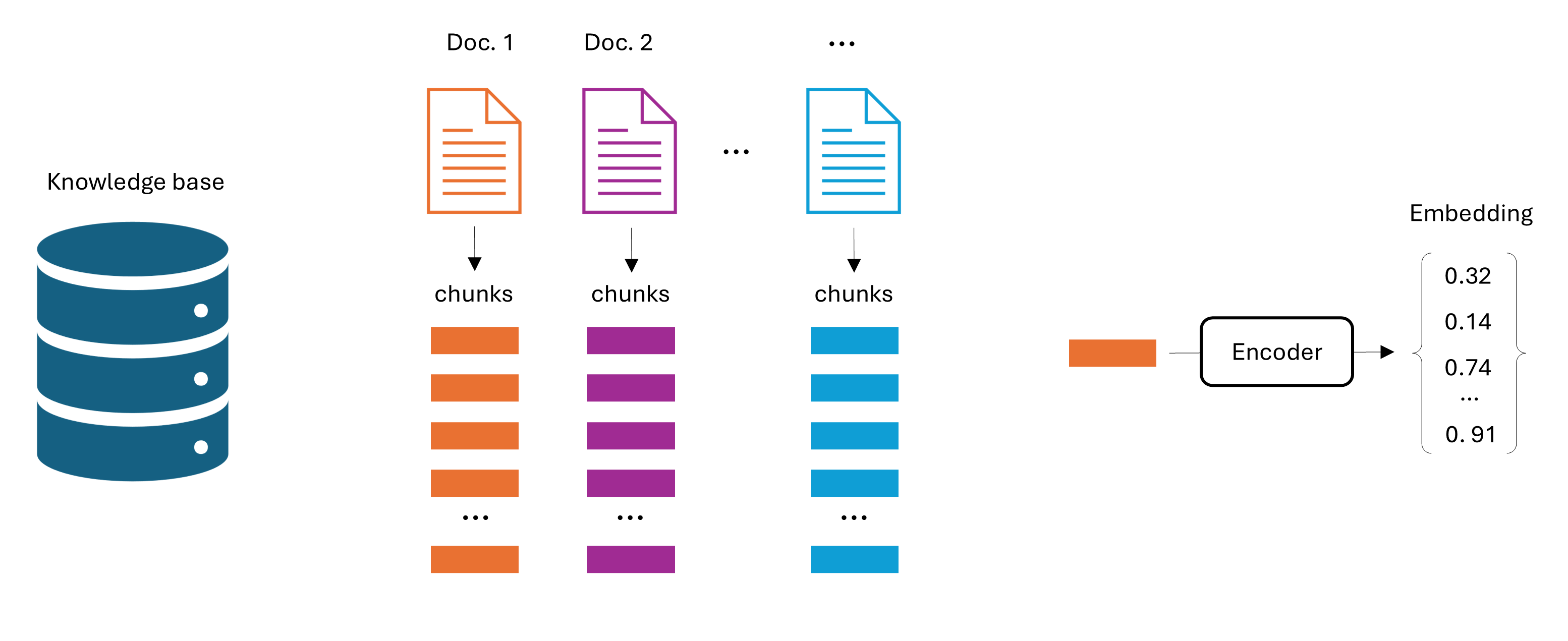
Step 1: The retrieve phase is the most important step for a good RAG system and it consists of two phases: pre-processing and retrieval.
In the pre-processing phase:
Collect the documents that will build our knowledge base.
Divide these documents into chunks. Usually each chunks consists of hundreds of tokens.
Embed these chunks into an embedding space using a deep learning model either pre-trained (e.g., BERT), or trained from scratch.
Design choices: chunk size, embedding size, overlap between chunks.
In the retrieval phase:
Select relevant candidates via embeddings-based similarity between the chunk embeddings and the input embedding.
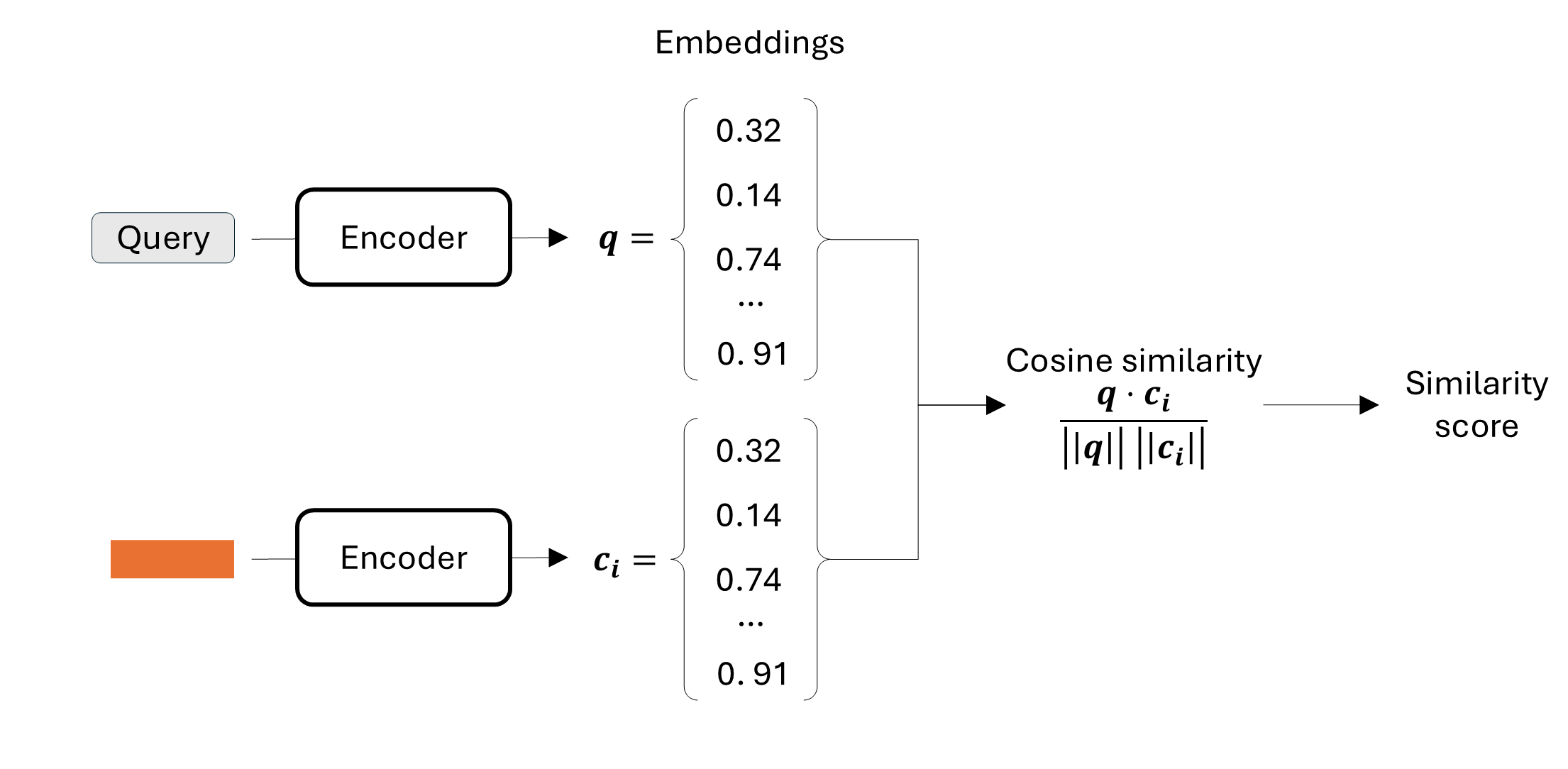
Rank the chunks for final relevance score.
Check this reference to know more: Wolfe C.R., The Basics of AI-Powered (Vector) Search: https://
Let’s have a look at the Python code!
We will use the LlamaIndex framework which is specifically designed for RAG applications and the Ollama library which helps to run LLMs locally, and can also be used with the OpenAI API.
# Connect to ollama before running the code. You can see the instructions to do this in the code below.
# Some imports
import torch
from llama_index.core import VectorStoreIndex, Document, Settings
from llama_index.core.node_parser import SentenceSplitter
from llama_index.llms.ollama import Ollama
from llama_index.embeddings.huggingface import HuggingFaceEmbedding
from datasets import load_dataset

# Define the encoder and the generation model
generation_model = "gemma3:270m"
encoder_model = "BAAI/bge-small-en-v1.5"

# Define some hyperparameters and Ollama settings
max_new_tokens: int = 4096
temperature: float = 0.1
context_window: int = 4096
ollama_base_url: str = "http://localhost:11434"
request_timeout: float = 120.0
# LLM settings for llama-index
Settings.llm = Ollama(
    model=model_config.generation_model,
    base_url=model_config.ollama_base_url,
    request_timeout=model_config.request_timeout,
    temperature=model_config.temperature,
    context_window=model_config.context_window,
    num_predict=model_config.max_new_tokens,
)

Settings.embed_model = HuggingFaceEmbedding(
    model_name=model_config.embedding_model,
    device="cuda" if CUDA_AVAILABLE else "cpu",
)
# Load dataset from Hugging Face
dataset = load_dataset("neural-bridge/rag-dataset-12000")
train_data = dataset["train"]
train_data = train_data.select(range(200)) # consider only a subset of the training data (optional)
# Convert Hugging Face dataset to LlamaIndex Documents
# We are indexing the 'context' field so we can retrieve it based on questions.
documents = []
for i, row in enumerate(train_data):
# You can store metadata (like the question or ID) alongside the text
doc = Document(
text=row["context"],
metadata={"id": i, "original_question": row["question"], "original_answer": row["answer"]}
)
documents.append(doc)
# RAG pre-processing phase
# Divide the documents into chunks
# Extract the embedding vector for each chunk with the encoder defined in Settings.embed_model
# Store the embedding vectors in a database
text_splitter = SentenceSplitter(chunk_size=256, chunk_overlap=20)
vector_index = VectorStoreIndex.from_documents(documents, transformations=[text_splitter])
vector_index.storage_context.persist(persist_dir="./storage")
# Set the retriever to retrieve the top_k chunks with the highest similarity with the query
query_engine = index.as_query_engine(similarity_top_k=3)
# Generation process with LLM defined above
test_question = "What is one of the most difficult things for yoga teachers after teaching a class?"
response = query_engine.query(test_question)
print("=== GENERATED ANSWER ===")
print(response)
# 2. Print the Retrieved Source Documents
print("=== RETRIEVED SOURCES (Top 3) ===")
for i, node in enumerate(response.source_nodes):
print(f"Source {i+1} (Score: {node.score:.4f}):")
print("-" * 20)
print(node.text) # This is the chunk of text from the dataset=== GENERATED ANSWER ===
The most difficult thing for yoga teachers after teaching a class is to help students find their own path and develop their own spiritual growth...
=== TOP 3 RETRIEVED SOURCES (Preview) ===
Source 1 (Score: 0.66):
Content: Last month saw the first anniversary of Ananda Meditation Group, Isle of Man...
----------------------------------------
Source 2 (Score: 0.64):
Content: Contrastingly, I witnessed 2 sincere members undergo great emotional healing of long standing problems...
----------------------------------------
Source 3 (Score: 0.63):
Content: We have the faith that God is taking care of everything and that, like all new ventures on The Path...# RAG pipeline (complete code)
# To be run in Google Colab where a GPU is available for free
# Install the missing dependencies
!pip install -q llama-index llama-index-llms-huggingface
!pip install -q llama-index-embeddings-huggingface
!pip install -q llama-index-readers-file ragas
!pip install -q pypdf loguru datasets sentence-transformers
!pip install -q llama-index-llms-ollama
!sudo apt update
!sudo apt install -y pciutils zstd
!curl -fsSL https://ollama.com/install.sh | sh
# Start ollama server
import threading
import subprocess
import time
def run_ollama_serve():
subprocess.Popen(["ollama", "serve"])
thread = threading.Thread(target=run_ollama_serve)
thread.start()
time.sleep(5)
!ollama pull gemma3:270m
# Imports
import os
from pathlib import Path
from typing import Optional
import torch
from loguru import logger
from llama_index.core import (
VectorStoreIndex,
SimpleDirectoryReader,
Settings,
StorageContext,
Document,
Response,
load_index_from_storage,
)
from llama_index.core.node_parser import SentenceSplitter
from llama_index.llms.ollama import Ollama
from llama_index.embeddings.huggingface import HuggingFaceEmbedding
# Check CUDA availability
CUDA_AVAILABLE = torch.cuda.is_available()
# Define the encoder and the generation model
generation_model = "gemma3:270m"
encoder_model = "BAAI/bge-small-en-v1.5"
# Define some hyperparameters and Ollama settings
max_new_tokens: int = 4096
temperature: float = 0.1
context_window: int = 4096
ollama_base_url: str = "http://localhost:11434"
request_timeout: float = 120.0
# LLM settings for llama-index
Settings.llm = Ollama(
model=model_config.generation_model,
base_url=model_config.ollama_base_url,
request_timeout=model_config.request_timeout,
temperature=model_config.temperature,
context_window=model_config.context_window,
num_predict=model_config.max_new_tokens,
)
Settings.embed_model = HuggingFaceEmbedding(
model_name=model_config.embedding_model,
device="cuda" if CUDA_AVAILABLE else "cpu",
)
# Load dataset from Hugging Face
dataset = load_dataset("neural-bridge/rag-dataset-12000")
train_data = dataset["train"]
train_data = train_data.select(range(200)) # consider only a subset of the training data (optional)

# Convert Hugging Face dataset to LlamaIndex Documents
# We are indexing the 'context' field so we can retrieve it based on questions.
documents = []
for i, row in enumerate(train_data):
    # You can store metadata (like the question or ID) alongside the text
    doc = Document(
        text=row["context"],
        metadata={"id": i, "original_question": row["question"], "original_answer": row["answer"]}
    )
    documents.append(doc)
# RAG pre-processing phase
# Divide the documents into chunks
# Extract the embedding vector for each chunk with the encoder defined in Settings.embed_model
# Store the embedding vectors in a database
text_splitter = SentenceSplitter(chunk_size=256, chunk_overlap=20)
vector_index = VectorStoreIndex.from_documents(documents, transformations=[text_splitter])
vector_index.storage_context.persist(persist_dir="./storage")
# Set the retriever to retrieve the top_k chunks with the highest similarity with the query
query_engine = index.as_query_engine(similarity_top_k=3)
# Generation process with LLM defined above
test_question = "What is one of the most difficult things for yoga teachers after teaching a class?"
response = query_engine.query(test_question)
print("=== GENERATED ANSWER ===")
print(response)
print("\n")
# 2. Print the Retrieved Source Documents
print("=== RETRIEVED SOURCES (Top 3) ===")
for i, node in enumerate(response.source_nodes):
print(f"Source {i+1} (Score: {node.score:.4f}):")
print("-" * 20)
print(node.text) # This is the chunk of text from the dataset
print("\n")Challenges of RAG systems:
RAG needs a large context window.
The retrieval phase in Step 1 plays a crucial role: it needs to maximize diversity of the documents, without providing useless information.
LLMs struggle to capture information in the middle of the context window, so the retrieved information placement needs to be optimized.
Data cleaning and formatting is challenging.
Tool usage
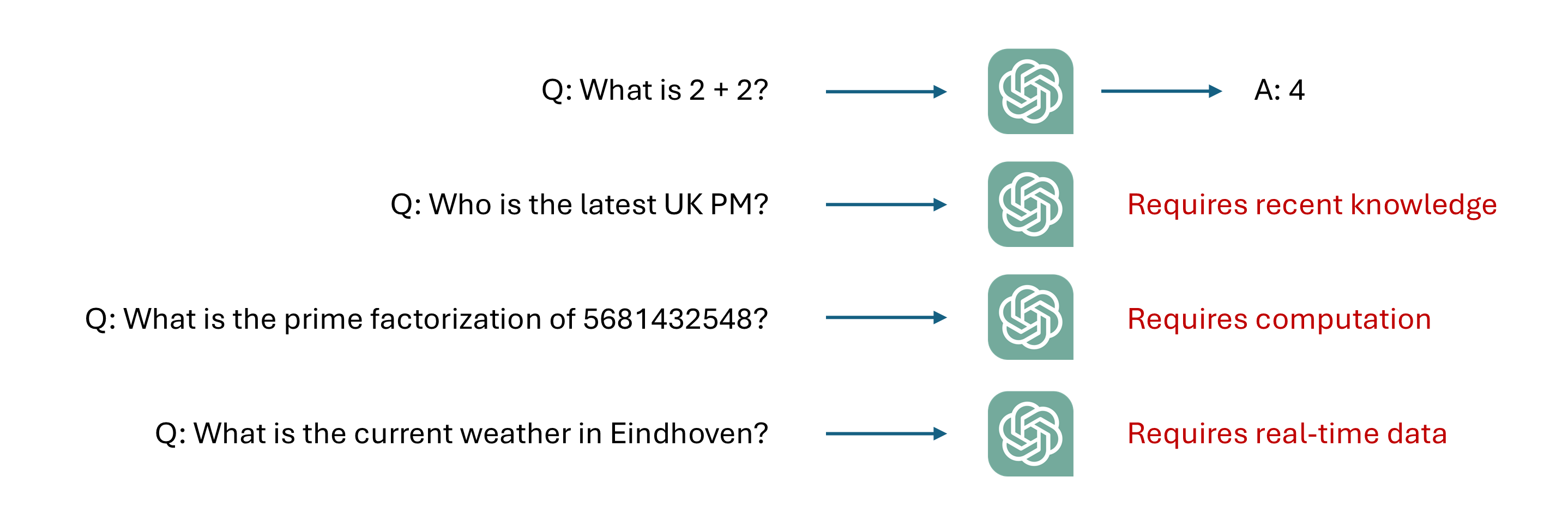
Picture inspired from LLM Agents MOOC | UC Berkeley CS294-196 Fall 2024
Tool definition
An external function or API that allows the LLM to interact with the environment.
A tool is:
External to the LLM (part of the environment).
Has a function interface callable with inputs/outputs parameters.
It is executable as a program.
Tool categories
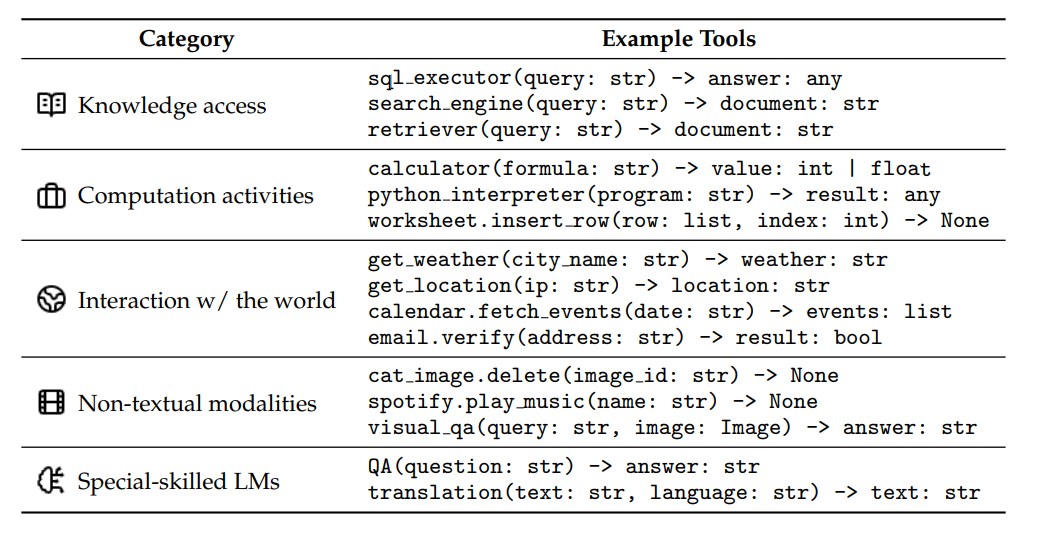
Source: What Are Tools Anyway? A Survey from the Language Model Perspective (Wang et al.)
How tool calling works
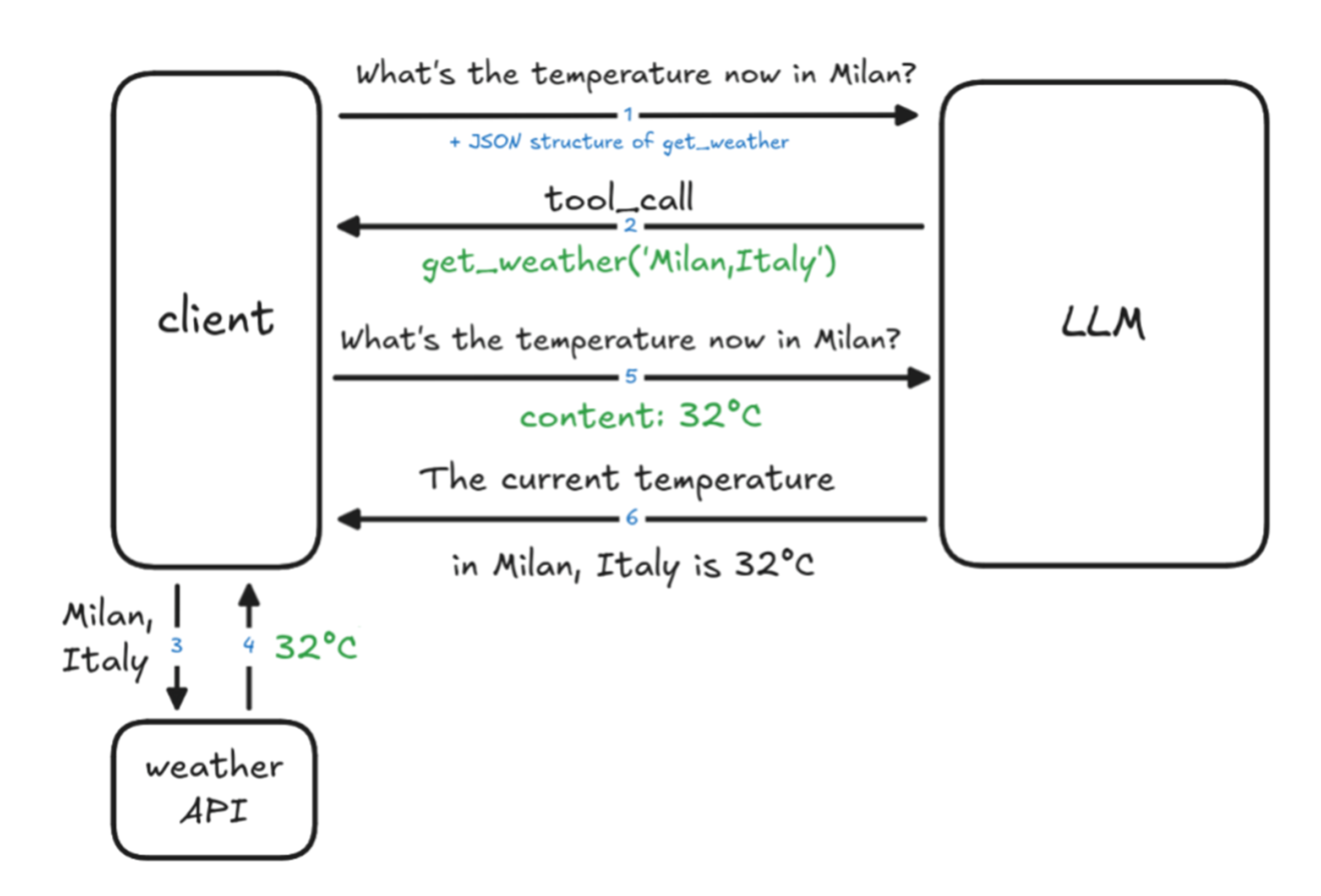
Source: Tools calling in Agentic AI
Let’s take a look at the Python code.
In this tutorial we are going to implement a function get_current_weather and integrate it within an LLM that supports tool calling. We are going to use the Llama3.2-1B model and the Ollama open-source framework which helps to run LLMs locally, and can also be used with the OpenAI API.
Feel free to have a look at the best LLMs that support tool calling here.
Initial downloads and imports
# Recommended to run in Google Colab with a T4 GPU

# Install the dependencies
!sudo apt update
!sudo apt install -y pciutils
!apt-get update && apt-get install -y zstd
!curl -fsSL https://ollama.com/install.sh | sh
!pip install openai

# Start ollama server
import threading
import subprocess
import time

def run_ollama_serve():
  subprocess.Popen(["ollama", "serve"])

thread = threading.Thread(target=run_ollama_serve)
thread.start()
time.sleep(5)
# Download a model that supports tool calling
!ollama pull llama3.2:1b

# Imports
import json
from openai import OpenAI

client = OpenAI(
    base_url='http://localhost:11434/v1',
    api_key='ollama'
)
Tool function
It is very important to have a descriptive, well-documented tool function. It can also have some backend calls and it needs to return a well-defined output.
# Tool function implementation
def get_current_weather(location: str, **kwargs) -> str:
    """
    Returns current weather for the given location.
    For now we will return a simple sentence but in production this would call a real weather API.

    Parameters:
        location: The city and country (e.g. 'Rome, Italy').

    Returns:
        A sentence describing the weather in the location.
    """
    return f"The weather in {location} is windy with a high of 5°C."
Function schema definition
This is needed to teach the LLM how to use the tool.
weather_tool = {
    "type": "function",
    "function": {
        "name": "get_current_weather",
        "description": "Get the current weather for a given location",
        "parameters": {
            "type": "object",
            "properties": {
                "location": {
                    "type": "string",
                    "description": "The city and country (e.g. 'Rome, Italy')"
                }
            },
            "required": ["location"]
        }
    }
}
Conversation setup
The system message is used to give context to your assistant.
messages = [
    {
        "role": "system",
        "content": "You are a helpful assistant. When users ask about current weather, "
                   "use the get_current_weather function to get accurate data."
    },
    {
        "role": "user",
        "content": "What's the weather in Amsterdam right now?"
    }
]
API call
response = client.chat.completions.create(
    model="llama3.2:1b",
    messages=messages,
    tools=[weather_tool], # Here you can have a list of tools
    tool_choice="auto"  # Let AI decide when to use functions
)
Instead of saying I don't have access to real-time data, the LLM recognizes it has a tool available and it calls a function. If we print the response from the previous cell we will have:
ChatCompletionMessage(content='',
                      refusal=None,
                      role='assistant',
                      annotations=None,
                      audio=None,
                      function_call=None,
                      tool_calls=[ChatCompletionMessageFunctionToolCall(
                                  id='call_z9soiomd',
                                  function=Function(arguments='{"Get":"","location":"Amsterdam, NL"}', name='get_current_weather'),
                                                                type='function',
                                                                index=0)])
Get final result
The LLM takes the function results and creates a response.
if assistant_message.tool_calls:
    messages.append(assistant_message)

    for tool_call in assistant_message.tool_calls:
        function_name = tool_call.function.name
        function_args = json.loads(tool_call.function.arguments)

        if function_name == "get_current_weather":
          clean_args = {"location": function_args.get("location")}
          function_result = get_current_weather(**clean_args)

        messages.append({
            "role": "tool",
            "tool_call_id": tool_call.id,
            "content": function_result
        })

    # Get final answer
    final_response = client.chat.completions.create(
        model="llama3.2:1b",
        messages=messages
    )

    print("Assistant:", final_response.choices[0].message.content)
Answer:
Assistant: Windy conditions, with a high of 5°C in Amsterdam, NL.Note: remember that the generation process of an LLM is stochastic so you might get different answers.
# Tool usage (complete code)
# To be run in Google Colab where a GPU is available for free

# Install the missing dependencies
!sudo apt update
!sudo apt install -y pciutils
!apt-get update && apt-get install -y zstd
!curl -fsSL https://ollama.com/install.sh | sh
!pip install openai

# Start ollama server
import threading
import subprocess
import time

def run_ollama_serve():
  subprocess.Popen(["ollama", "serve"])

thread = threading.Thread(target=run_ollama_serve)
thread.start()
time.sleep(5)
!ollama pull llama3.2:1b

# Imports
from openai import OpenAI
import json

# API setup
# Colab's local address for the background service
client = OpenAI(
    base_url='http://localhost:11434/v1',
    api_key='ollama'
)

# Tool definition
def get_current_weather(location: str, **kwargs) -> str:
    """
    Returns current weather for the given location.
    In production, this would call a real weather API.
    """
    return f"The weather in {location} is windy with a high of 5°C."

# Function schema definition
weather_tool = {
    "type": "function",
    "function": {
        "name": "get_current_weather",
        "description": "Get the current weather for a given location",
        "parameters": {
            "type": "object",
            "properties": {
                "location": {
                    "type": "string",
                    "description": "The city and country (e.g. 'London, UK')"
                }
            },
            "required": ["location"]
        }
    }
}

# Conversations etup
messages = [
    {
        "role": "system",
        "content": "You are a helpful assistant. When users ask about current weather, "
                   "use the get_current_weather function to get accurate data."
    },
    {
        "role": "user",
        "content": "What's the weather in Amsterdam, NL right now?"
    }
]

# API call
response = client.chat.completions.create(
    model="llama3.2:1b",
    messages=messages,
    tools=[weather_tool],
    tool_choice="required"  # Let AI decide when to use functions
)

assistant_message = response.choices[0].message

if assistant_message.tool_calls:
    messages.append(assistant_message)

    for tool_call in assistant_message.tool_calls:
        function_name = tool_call.function.name
        function_args = json.loads(tool_call.function.arguments)

        if function_name == "get_current_weather":
          clean_args = {"location": function_args.get("location")}
          function_result = get_current_weather(**clean_args)

        messages.append({
            "role": "tool",
            "tool_call_id": tool_call.id,
            "content": function_result
        })

    # Get final answer
    final_response = client.chat.completions.create(
        model="llama3.2:1b",
        messages=messages
    )

    print("Assistant:", final_response.choices[0].message.content)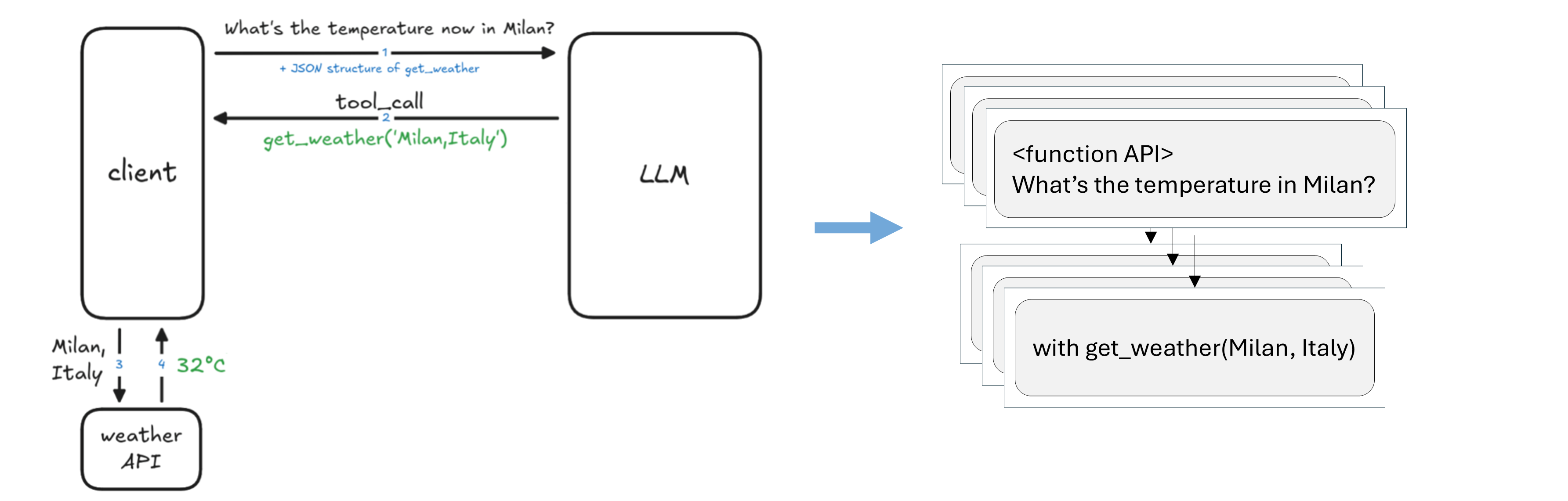
Collect SFT pairs for response generation, which will actually contain the whole conversation history.
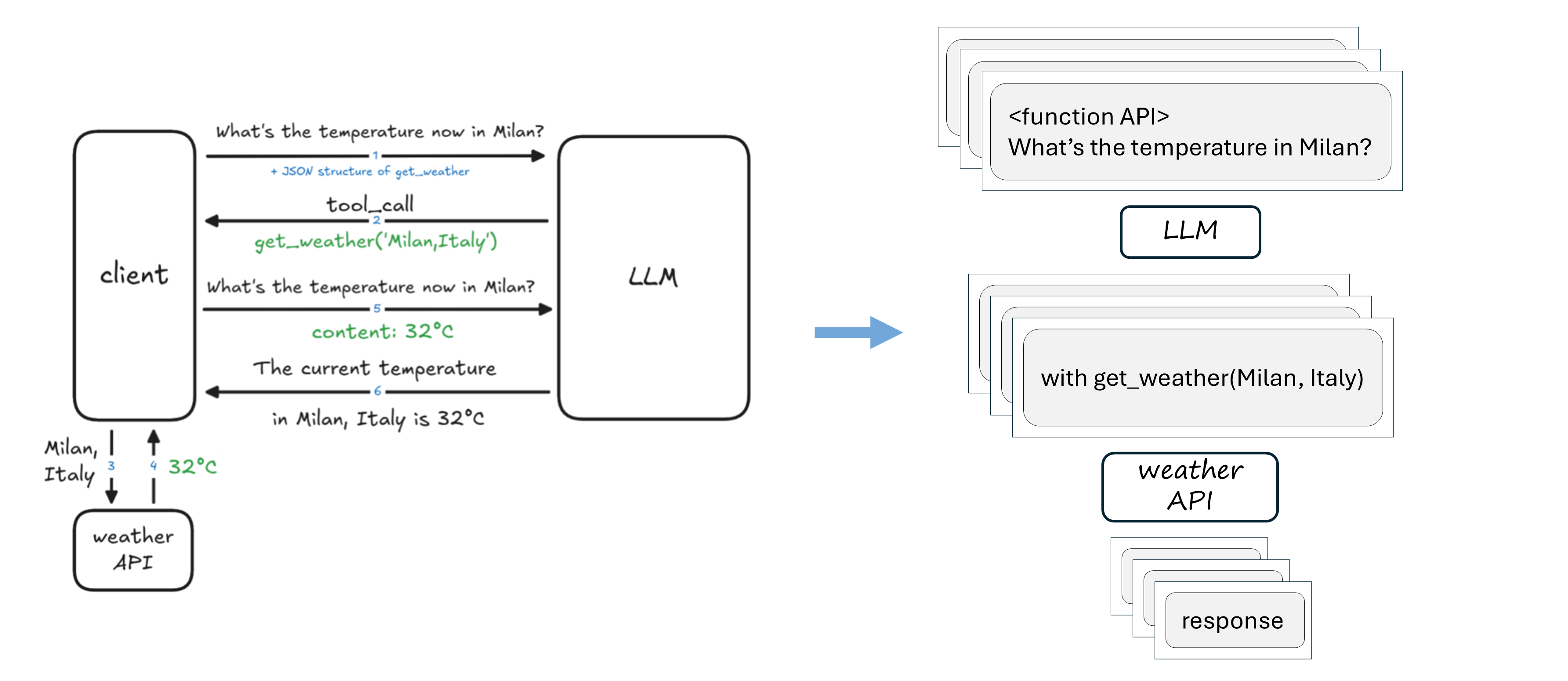
But is it really necessary to re-train or fine-tuning an LLM?
Method 2: Prompting
Extend the current prompt with more information:

First approach: few-shot learning. This is very simple and powerful, but it lacks generalization to unseen examples.
Second approach: use a powerful model with SFT pairs to write the detailed explanation for you.
In practice we have many tools
Benefits
LLMs become more powerful
LLMs can interact with the real world
Overcomes the “knowledge cutoff” limitation
Challenges
More tools decrease performance
Finite context length not scalable with the number of tools
Many tools to define lot of work
To know more read The Hidden Costs of Tool Overload: Why Less is More for Project Managers.
Tool selection
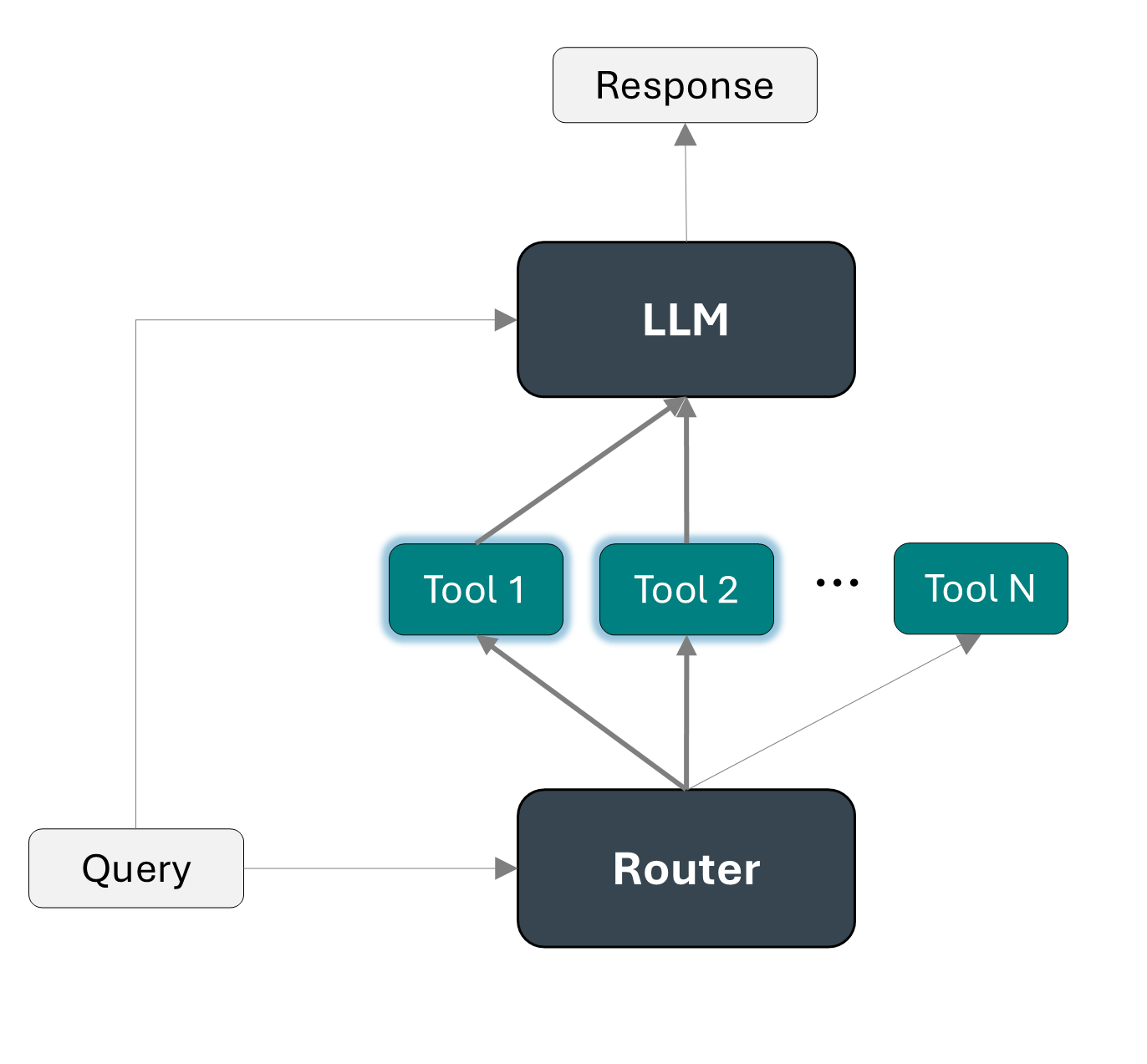
One possibility is to use a router, as detailed in Automatic Tool Selection to Reduce Large Language Model Latency (2024).
In the first stage a router filter the large set of tools, selecting only the ones that might be useful. Then the LLM is input only with the selected list of tools and the query and it can decide what tool fits best the purpose of the query.
Model Context Protocol (MCP)
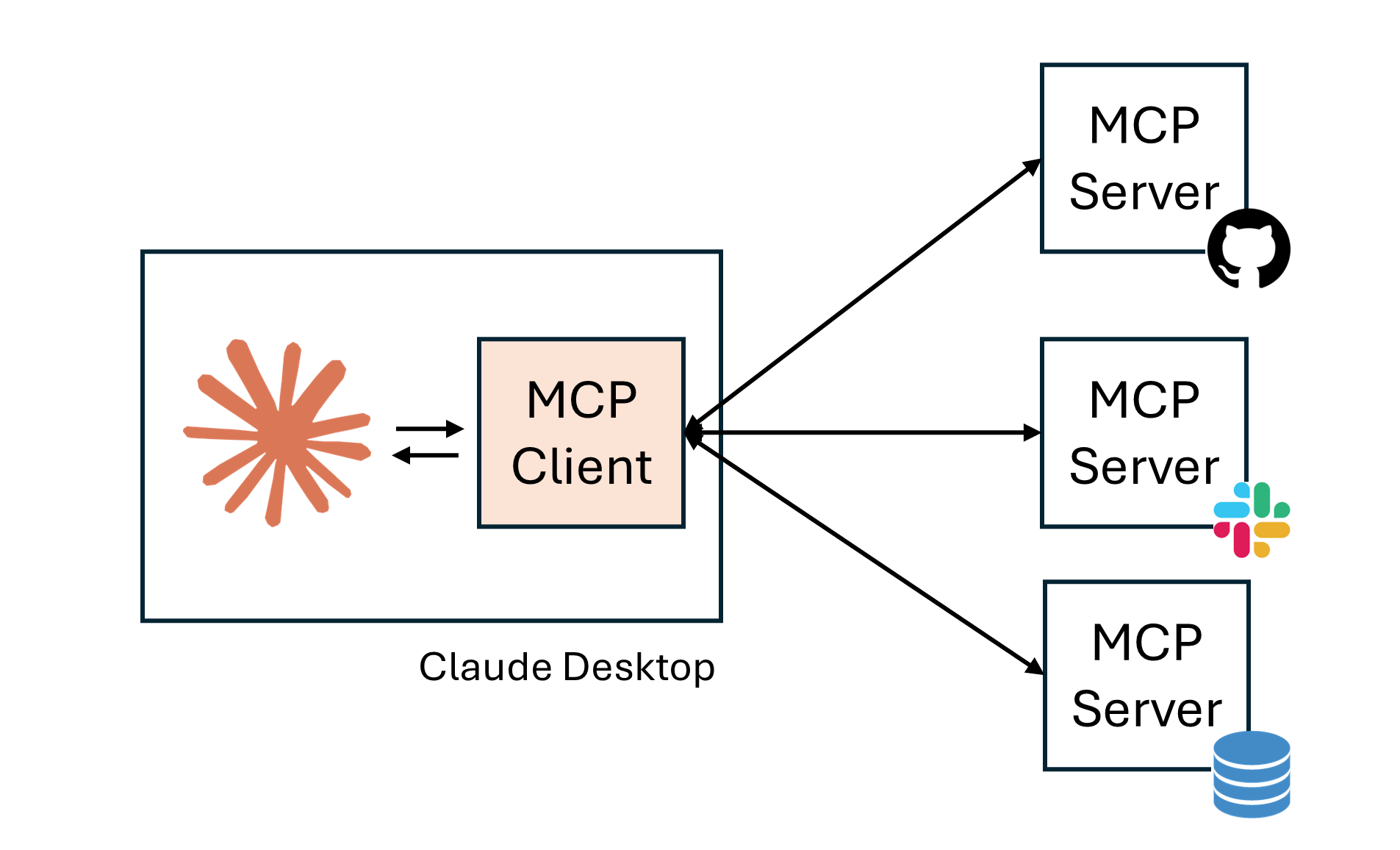
MCP is an open-source standard for connecting AI models to external data and tools.
It consists of a client-server architecture with the following structure:
|  |
To build a new MCP Server we can simply implement the three key primitives:
Prompt template
Resources like data, filesystems or database
Tools
Example functions definition:
# Define prompts
@mcp.prompt()
def prompt(user_name:str, user_title:str) -> str:
    """Define the prompt"""

# Define resources with a Unique Resource Identifier (URI)
@mcp.resource("directory://all")
def get_directory() -> str:
    """Get the directory with contacts"""

# Define tools
@mcp.tool()
def write_email_draft(recipient_email: str, subject: str, body: str) -> dict:
    """Create a draft email using the Gmail API."""
Benefits of MCP
There is a unique standard that everyone can use
It makes context sharing and tool interoperability easier
It can efficiently handle multiple tools and data repositories
Challenges and next steps for LLM agents
Challenges
Hallucination
Security risks (e.g., prompt injection or data exfiltration)
Reasoning abilities are still a bottleneck
Evaluation is challenging
Next steps
Multi-agent orchestration
Human-in-the-loop approaches
Better evaluation benchmarks
Useful resources
Stanford CME295 course. Transformers & LLMs. (Autumn 2025).
UC Berkeley CS294-196 course. LLM Agents History & Overview. (Fall 2024)
Prompt Engineering Guide, LLM Agents: https://
www .promptingguide .ai /research /llm -agents Wolfe C.R., A Practitioners Guide to Retrieval Augmented Generation (RAG): https://
cameronrwolfe .substack .com /p /a -practitioners -guide -to -retrieval (2024). Wolfe C.R., The Basics of AI-Powered (Vector) Search: https://
cameronrwolfe .substack .com /p /the -basics -of -ai -powered -vector -search (2024). Qu, Changle, et al. “Tool learning with large language models: A survey.” Frontiers of Computer Science 19.8 (2025): 198343.
Wang, Zhiruo, et al. “What are tools anyway? a survey from the language model perspective.” arXiv preprint arXiv:2403.15452 (2024).
Diamant N., How to Make AI Take Real-World Actions + Code: https://
diamantai .substack .com /p /how -to -make -ai -take -real -world -actions. (2025). Berkley Function-Calling Leaderboard. https://
gorilla .cs .berkeley .edu /leaderboard .html (2025). Model Context Protocol (MCP) Explained in 20 Minutes: https://
www .youtube .com /watch ?v = N3vHJcHBS -w & t = 488s