Making linear models non-linear
Joaquin Vanschoren
Source
# Auto-setup when running on Google Colab
import os
if 'google.colab' in str(get_ipython()) and not os.path.exists('/content/master'):
    !git clone -q https://github.com/ML-course/master.git /content/master
    !pip --quiet install -r /content/master/requirements_colab.txt
    %cd master/notebooks

# Global imports and settings
%matplotlib inline
from preamble import *
interactive = True # Set to True for interactive plots
if interactive:
    fig_scale = 0.5
    plt.rcParams.update(print_config)
else: # For printing
    fig_scale = 1.3
    plt.rcParams.update(print_config)
Feature Maps
Linear models:
When we cannot fit the data well, we can add non-linear transformations of the features
Feature map (or basis expansion ) :
E.g. Polynomial feature map: all polynomials up to degree and all products
Example with :
Ridge regression example
Source
from sklearn.linear_model import Ridge

X, y = mglearn.datasets.make_wave(n_samples=100)
line = np.linspace(-3, 3, 1000, endpoint=False).reshape(-1, 1)
reg = Ridge().fit(X, y)
print("Weights:",reg.coef_)
fig = plt.figure(figsize=(8*fig_scale,4*fig_scale))
plt.plot(line, reg.predict(line), label="linear regression", lw=2*fig_scale)

plt.plot(X[:, 0], y, 'o', c='k')
plt.ylabel("Regression output")
plt.xlabel("Input feature")
plt.legend(loc="best");
Weights: [0.418]
Add all polynomials up to degree 10 and fit again:
e.g. use sklearn
PolynomialFeatures
Source
from sklearn.preprocessing import PolynomialFeatures

# include polynomials up to x ** 10:
# the default "include_bias=True" adds a feature that's constantly 1
poly = PolynomialFeatures(degree=10, include_bias=False)
poly.fit(X)
X_poly = poly.transform(X)
styles = [dict(selector="td", props=[("font-size", "150%")]),dict(selector="th", props=[("font-size", "150%")])]
pd.DataFrame(X_poly, columns=poly.get_feature_names_out()).head().style.set_table_styles(styles)Source
reg = Ridge().fit(X_poly, y)
print("Weights:",reg.coef_)
line_poly = poly.transform(line)
fig = plt.figure(figsize=(8*fig_scale,4*fig_scale))
plt.plot(line, reg.predict(line_poly), label='polynomial linear regression', lw=2*fig_scale)
plt.plot(X[:, 0], y, 'o', c='k')
plt.ylabel("Regression output")
plt.xlabel("Input feature", labelpad=0.1)
plt.tick_params(axis='both', pad=0.1)
plt.legend(loc="best");
Weights: [ 0.643 0.297 -0.69 -0.264 0.41 0.096 -0.076 -0.014 0.004 0.001]
How expensive is this?
You may need MANY dimensions to fit the data
Memory and computational cost
More weights to learn, more likely overfitting
Ridge has a closed-form solution which we can compute with linear algebra:
Since X has rows (examples), and columns (features), has dimensionality
Hence Ridge is quadratic in the number of features,
After the feature map , we get
Since increases a lot, becomes huge
Linear SVM example (classification)
Source
from sklearn.datasets import make_blobs
from sklearn.svm import LinearSVC
X, y = make_blobs(centers=4, random_state=8)
y = y % 2
linear_svm = LinearSVC().fit(X, y)

fig = plt.figure(figsize=(8*fig_scale,4*fig_scale))
mglearn.plots.plot_2d_separator(linear_svm, X)
mglearn.discrete_scatter(X[:, 0], X[:, 1], y, s=10*fig_scale)
plt.xlabel("Feature 1")
plt.ylabel("Feature 2");We can add a new feature by taking the squares of feature1 values
Source
# add the squared first feature
X_new = np.hstack([X, X[:, 1:] ** 2])

# visualize in 3D
fig = plt.figure(figsize=(8*fig_scale,4*fig_scale))
ax = fig.add_subplot(111, projection='3d')

# plot first all the points with y==0, then all with y == 1
mask = y == 0
ax.scatter(X_new[mask, 0], X_new[mask, 1], X_new[mask, 2], c='b',
           cmap=mglearn.cm2, s=10*fig_scale)
ax.scatter(X_new[~mask, 0], X_new[~mask, 1], X_new[~mask, 2], c='r', marker='^',
           cmap=mglearn.cm2, s=10*fig_scale)
ax.set_xlabel("feature1", labelpad=-9)
ax.set_ylabel("feature2", labelpad=-9)
ax.set_zlabel("feature2 ** 2", labelpad=-9);
ax.tick_params(axis='both', width=0, labelsize=5*fig_scale, pad=-3)Now we can fit a linear model
Source
linear_svm_3d = LinearSVC().fit(X_new, y)
coef, intercept = linear_svm_3d.coef_.ravel(), linear_svm_3d.intercept_

# show linear decision boundary
fig = plt.figure(figsize=(8*fig_scale,4*fig_scale))
ax = fig.add_subplot(111, projection='3d')
xx = np.linspace(X_new[:, 0].min() - 2, X_new[:, 0].max() + 2, 50)
yy = np.linspace(X_new[:, 1].min() - 2, X_new[:, 1].max() + 2, 50)

XX, YY = np.meshgrid(xx, yy)
ZZ = (coef[0] * XX + coef[1] * YY + intercept) / -coef[2]
ax.plot_surface(XX, YY, ZZ, rstride=8, cstride=8, alpha=0.3)
ax.scatter(X_new[mask, 0], X_new[mask, 1], X_new[mask, 2], c='b',
           cmap=mglearn.cm2, s=10*fig_scale)
ax.scatter(X_new[~mask, 0], X_new[~mask, 1], X_new[~mask, 2], c='r', marker='^',
           cmap=mglearn.cm2, s=10*fig_scale)

ax.set_xlabel("feature1", labelpad=-9)
ax.set_ylabel("feature2", labelpad=-9)
ax.set_zlabel("feature2 ** 2", labelpad=-9);
ax.tick_params(axis='both', width=0, labelsize=10*fig_scale, pad=-6)As a function of the original features, the decision boundary is now a polynomial as well
Source
ZZ = YY ** 2
dec = linear_svm_3d.decision_function(np.c_[XX.ravel(), YY.ravel(), ZZ.ravel()])
figure = plt.figure(figsize=(8*fig_scale,4*fig_scale))
plt.contourf(XX, YY, dec.reshape(XX.shape), levels=[dec.min(), 0, dec.max()],
             cmap=mglearn.cm2, alpha=0.5)
mglearn.discrete_scatter(X[:, 0], X[:, 1], y, s=10*fig_scale)
plt.xlabel("Feature 1")
plt.ylabel("Feature 2"); The kernel trick
Computations in explicit, high-dimensional feature maps are expensive
For some feature maps, we can, however, compute distances between points cheaply
Without explicitly constructing the high-dimensional space at all
Example: quadratic feature map for :
A kernel function exists for this feature map to compute dot products
Skip computation of and and compute directly
Kernelization
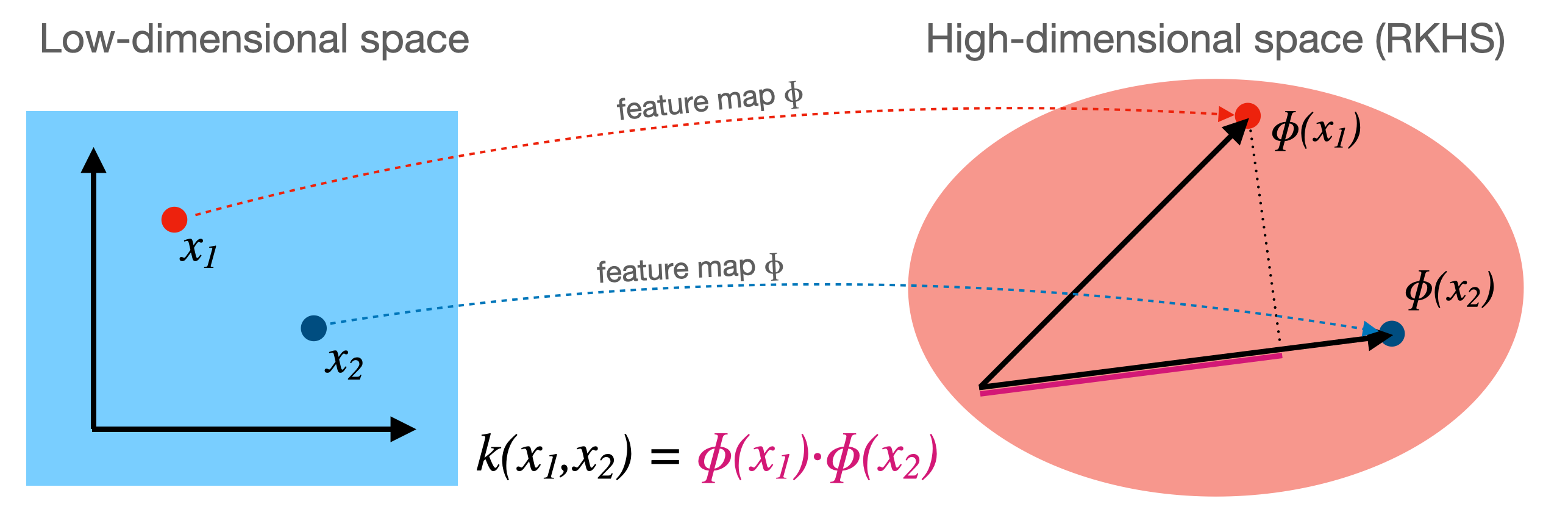
Kernel corresponding to a feature map :
Computes dot product between in a high-dimensional space
Kernels are sometimes called generalized dot products
is called the reproducing kernel Hilbert space (RKHS)
The dot product is a measure of the similarity between
Hence, a kernel can be seen as a similarity measure for high-dimensional spaces
If we have a loss function based on dot products it can be kernelized
Simply replace the dot products with
Example: SVMs
Linear SVMs (dual form, for support vectors with dual coefficients and classes ):
Kernelized SVM, using any existing kernel we want:
Source
from sklearn import svm

def plot_svm_kernels(kernels, poly_degree=3, gamma=2, C=1, size=4):
    # Our dataset and targets
    X = np.c_[(.4, -.7),
              (-1.5, -1),
              (-1.4, -.9),
              (-1.3, -1.2),
              (-1.1, -.2),
              (-1.2, -.4),
              (-.5, 1.2),
              (-1.5, 2.1),
              (1, 1),
              # --
              (1.3, .8),
              (1.2, .5),
              (.2, -2),
              (.5, -2.4),
              (.2, -2.3),
              (0, -2.7),
              (1.3, 2.1)].T
    Y = [0] * 8 + [1] * 8

    # figure number
    fig, axes = plt.subplots(-(-len(kernels)//3), min(len(kernels),3), figsize=(min(len(kernels),3)*size*1.2*fig_scale, -(-len(kernels)//3)*size*fig_scale), tight_layout=True)
    if len(kernels) == 1:
        axes = np.array([axes])
    if not isinstance(gamma,list):
        gamma = [gamma]*len(kernels)
    if not isinstance(C,list):
        C = [C]*len(kernels)
    # fit the model
    for kernel, ax, g, c in zip(kernels,axes.reshape(-1),gamma,C):
        clf = svm.SVC(kernel=kernel, gamma=g, C=c, degree=poly_degree)
        clf.fit(X, Y)

        # plot the line, the points, and the nearest vectors to the plane
        if kernel == 'rbf':
            ax.set_title(r"kernel = {}, $\gamma$={}, C={}".format(kernel, g, c), pad=0.1)
        else:
            ax.set_title('kernel = %s' % kernel,pad=0.1)

        ax.scatter(clf.support_vectors_[:, 0], clf.support_vectors_[:, 1],
                    s=25, edgecolors='grey', c='w', zorder=10, linewidths=0.5)
        ax.scatter(X[:, 0], X[:, 1], c=Y, zorder=10, cmap=plt.cm.bwr, s=10*fig_scale)

        for i, coef in enumerate(clf.dual_coef_[0]):
            ax.annotate("%0.2f" % (coef), (clf.support_vectors_[i, 0]+0.1,clf.support_vectors_[i, 1]+0.25), zorder=11, fontsize=3)

        ax.axis('tight')
        x_min = -3
        x_max = 3
        y_min = -3
        y_max = 3

        XX, YY = np.mgrid[x_min:x_max:200j, y_min:y_max:200j]
        Z = clf.decision_function(np.c_[XX.ravel(), YY.ravel()])

        # Put the result into a color plot
        Z = Z.reshape(XX.shape)
        #plt.pcolormesh(XX, YY, Z > 0, cmap=plt.cm.bwr, alpha=0.1)
        ax.contour(XX, YY, Z, colors=['k', 'k', 'k', 'k', 'k'], linestyles=['--', ':', '-', ':', '--'],
                    levels=[-1, -0.5, 0, 0.5, 1])

        ax.set_xlim(x_min, x_max)
        ax.set_ylim(y_min, y_max)

        ax.set_xticks([])
        ax.set_yticks([])

    plt.tight_layout()
    plt.show()
plot_svm_kernels(['linear', 'poly'],poly_degree=3,size=3.5)Which kernels exist?
A (Mercer) kernel is any function with these properties:
Symmetry:
Positive definite: the kernel matrix is positive semi-definite
Intuitively,
The kernel matrix (or Gram matrix) for points of is defined as:
Once computed (), simply lookup for any two points
In practice, you can either supply a kernel function or precompute the kernel matrix
Linear kernel
Input space is same as output space:
Feature map
Kernel:
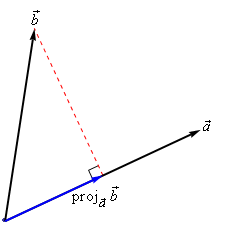
Geometrically, the dot product is the projection of on hyperplane defined by
Becomes larger if and are in the same ‘direction’
Linear kernel between point (0,1) and another unit vector an angle (in radians)
Points with similar angles are deemed similar
Source
from sklearn.metrics.pairwise import linear_kernel, polynomial_kernel, rbf_kernel
import math
import ipywidgets as widgets
from ipywidgets import interact, interact_manual

def plot_lin_kernel():
    fig, ax = plt.subplots(figsize=(5*fig_scale,3*fig_scale))
    x = np.linspace(-math.pi,math.pi,100)
    # compare point (0,1) with unit vector at certain angle
    # linear_kernel returns the kernel matrix, get first element
    ax.plot(x,[linear_kernel([[1,0]], [[math.cos(i),math.sin(i)]])[0] for i in x],lw=2*fig_scale,c='b',label='', linestyle='-')
    ax.set_xlabel("angle $(-\pi,\pi)$ between unit vectors $x_1$ and $x_2$")
    ax.set_ylabel("lin_kernel")
    plt.grid()
plot_lin_kernel()Polynomial kernel
If , are kernels, then (), , and are also kernels
The polynomial kernel (for degree ) reproduces the polynomial feature map
is a scaling hyperparameter (default )
is a hyperparameter (default 1) to trade off influence of higher-order terms
Source
@interact
def plot_poly_kernel(degree=(1,10,1), coef0=(0,2,0.5), gamma=(0,2,0.5)):
    fig, ax = plt.subplots(figsize=(5*fig_scale,3*fig_scale))
    x = np.linspace(-math.pi,math.pi,100)
    # compare point (0,1) with unit vector at certain angle
    if isinstance(degree,list):
        for d in degree:
            ax.plot(x,[polynomial_kernel([[1,0]], [[math.cos(i),math.sin(i)]], degree=d, coef0=coef0, gamma=gamma)[0]
                       for i in x],lw=2*fig_scale,label='degree = {}'.format(d), linestyle='-')
    else:
        ax.plot(x,[polynomial_kernel([[1,0]], [[math.cos(i),math.sin(i)]], degree=degree, coef0=coef0, gamma=gamma)[0]
                   for i in x],lw=2*fig_scale,c='b',label='degree = {}'.format(degree), linestyle='-')
    ax.set_xlabel("angle $(-\pi,\pi)$ between unit vectors $x_1$ and $x_2$")
    ax.set_ylabel("poly_kernel")
    plt.grid()
plt.legend()Source
if not interactive:
    plot_poly_kernel(degree=[2,3,5], coef0=1, gamma=None)
RBF (Gaussian) kernel
The Radial Basis Function (RBF) feature map is related to the Taylor series expansion of
RBF (or Gaussian ) kernel with kernel width :
Source
from sklearn.metrics.pairwise import polynomial_kernel, rbf_kernel
import ipywidgets as widgets
from ipywidgets import interact, interact_manual

@interact
def plot_rbf_kernel(gamma=(0.01,10,0.1)):
    fig, ax = plt.subplots(figsize=(4*fig_scale,2.5*fig_scale))
    x = np.linspace(-6,6,100)
    if isinstance(gamma,list):
        for g in gamma:
            ax.plot(x,[rbf_kernel([[i]], [[0]], gamma=g)[0] for i in x],lw=2*fig_scale,label='gamma = {}'.format(g), linestyle='-')
    else:
        ax.plot(x,[rbf_kernel([[i]], [[0]], gamma=gamma)[0] for i in x],lw=2*fig_scale,c='b',label='gamma = {}'.format(gamma), linestyle='-')
    ax.set_xlabel("x (distance )",labelpad=0.1)
    ax.set_ylabel("rbf_kernel(0,x)")
    ax.set_ylim(0,1)
    ax.legend(bbox_to_anchor=(1.05, 1), loc=2)
plt.grid()Taylor expansion: the more we add components, the more we can approximate any function
import matplotlib.cm as cm

# Generate x values
x = np.linspace(-2, 2, 100)

# Calculate corresponding y values for e^x
y_actual = np.exp(x)

# Plot the actual function
fig, ax = plt.subplots(figsize=(5*fig_scale,3*fig_scale))
plt.plot(x, y_actual, label='e^x', linewidth=1, color='black')

# Plot the individual terms of the Taylor expansion with formulas in the legend
colors = cm.gist_rainbow(np.linspace(0, 1, 10))  # Color scheme from red to blue
for n in range(10):
    term = x**n / np.math.factorial(n)
    partial_sum = np.sum([x**i / np.math.factorial(i) for i in range(n + 1)], axis=0)

    # Plot partial sums with different colors
    plt.plot(x, partial_sum, label=f'Partial Sum {n}', linestyle='dashed', color=colors[n])

# Add labels and title
plt.xlabel('x')
plt.ylabel('y')
plt.title('Components and Partial Sums of $e^x$ and its Taylor Expansion')

# Display legend
plt.legend();Source
if not interactive:
    plot_rbf_kernel(gamma=[0.1,0.5,10])
The RBF kernel does not use a dot product
It only considers the distance between and
It’s a local kernel : every data point only influences data points nearby
linear and polynomial kernels are global : every point affects the whole space
Similarity depends on closeness of points and kernel width
value goes up for closer points and wider kernels (larger overlap)
Source
def gaussian(x, mu, gamma):
    k=2 # Doubling the distance makes the figure more interpretable
    return np.exp(-gamma * np.power((x - mu)*k, 2.))

@interact
def plot_rbf_kernel_value(gamma=(0.1,1,0.1),x_1=(-6,6,0.1),x_2=(-6,6,0.1)):
    fig, ax = plt.subplots(figsize=(6*fig_scale,4*fig_scale))
    x = np.linspace(-6,6,100)
    ax.plot(x,gaussian(x, x_1, gamma),lw=2*fig_scale,label='gaussian at x_1'.format(gamma), linestyle='-')
    ax.plot(x,gaussian(x, x_2, gamma),lw=2*fig_scale,label='gaussian at x_2'.format(gamma), linestyle='-')
    ax.plot(x,[rbf_kernel([[x_1]], [[x_2]], gamma=gamma)[0]]*len(x),lw=2,c='g',label='rfb_kernel(x_1,x_2)', linestyle='-')
    ax.set_xlabel("x")
    ax.set_ylabel(r"rbf_kernel($\gamma$={})".format(gamma))
    ax.set_ylim(0,1)
    ax.legend(bbox_to_anchor=(1.05, 1), loc=2)
plt.grid()Source
if not interactive:
    plot_rbf_kernel_value(gamma=0.2,x_1=0,x_2=2)
Kernelized SVMs in practice
You can use SVMs with any kernel to learn non-linear decision boundaries
Source
plot_svm_kernels(['linear', 'poly', 'rbf'],poly_degree=3,gamma=2,size=4)SVM with RBF kernel
Every support vector locally influences predictions, according to kernel width ()
The prediction for test point : sum of the remaining influence of each support vector
Source
@interact
def plot_rbf_data(gamma=(0.1,10,0.5),C=(0.01,5,0.1)):
plot_svm_kernels(['rbf'],gamma=gamma,C=C,size=5)Source
if not interactive:
    plot_svm_kernels(['rbf','rbf','rbf'],gamma=[0.1,1,5],size=4)
Tuning RBF SVMs
gamma (kernel width)
high values cause narrow Gaussians, more support vectors, overfitting
low values cause wide Gaussians, underfitting
C (cost of margin violations)
high values punish margin violations, cause narrow margins, overfitting
low values cause wider margins, more support vectors, underfitting
Source
%%HTML
<style>
.reveal img {
    margin-top: 0px;
}
</style>Source
plot_svm_kernels(['rbf','rbf','rbf','rbf','rbf','rbf','rbf','rbf','rbf'],
                 gamma=[0.1,1,5,0.1,1,5,0.1,1,5],
C=[0.001,0.001,0.001,1,1,1,100,100,100],size=2.6)Kernel overview
Source
from sklearn.svm import SVC
names = ["Linear SVM", "RBF", "Polynomial"]

classifiers = [
    SVC(kernel="linear", C=0.025),
    SVC(gamma=2, C=1),
    SVC(kernel="poly", degree=3, C=0.1)
    ]

mglearn.plots.plot_classifiers(names, classifiers, figuresize=(20*fig_scale,8*fig_scale)) SVMs in practice
C and gamma always need to be tuned
Interacting regularizers. Find a good C, then finetune gamma
SVMs expect all features to be approximately on the same scale
Data needs to be scaled beforehand
Allow to learn complex decision boundaries, even with few features
Work well on both low- and high dimensional data
Especially good at small, high-dimensional data
Hard to inspect, although support vectors can be inspected
In sklearn, you can use
SVCfor classification with a range of kernelsSVRfor regression
Other kernels
There are many more possible kernels
If no kernel function exists, we can still precompute the kernel matrix
All you need is some similarity measure, and you can use SVMs
Text kernels:
Word kernels: build a bag-of-words representation of the text (e.g. TFIDF)
Kernel is the inner product between these vectors
Subsequence kernels: sequences are similar if they share many sub-sequences
Build a kernel matrix based on pairwise similarities
Graph kernels: Same idea (e.g. find common subgraphs to measure similarity)
These days, deep learning embeddings are more frequently used
The Representer Theorem
We can kernelize many other loss functions as well
The Representer Theorem states that if we have a loss function with
an arbitrary loss function using some function of the inputs
a (non-decreasing) regularization score (e.g. L1 or L2) and constant
Then the weights can be described as a linear combination of the training samples:
Note that this is exactly what we found for SVMs:
Hence, we can also kernelize Ridge regression, Logistic regression, Perceptrons, Support Vector Regression, ...
Kernelized Ridge regression
The linear Ridge regression loss (with ):
Filling in yields the dual formulation:
Generalize to
Example of kernelized Ridge
Prediction (red) is now a linear combination of kernels (blue):
We learn a dual coefficient for each point
Source
import scipy.stats as stats
import math

@interact
def plot_kernel_ridge(gamma=(0.1,2,0.1),a1=(-1,1,0.1),a2=(-1,1,0.1),a3=(-1,1,0.1)):
    fig, ax = plt.subplots(figsize=(10*fig_scale,5*fig_scale))
    xs = [-6,-4,-3,0,2,4]
    ys = [-0.3,0.05,-0.1,0.3,0.16,-0.05]
    alphas = [a1,a2,a3,.7,0.3,-0.2]
    p = np.linspace(-10, 10, 100)
    f = [0]*100
    for a,x,y in zip(alphas,xs,ys):
        k = stats.norm.pdf(p, x, 1/gamma)
        f += a*k
        plt.plot(p, k, 'b-', lw=1*fig_scale)
        plt.annotate("%0.2f" % (a), (x+0.1,y+0.01), fontsize=20*fig_scale, zorder=11)
    plt.plot(p, f, 'r-', lw=3*fig_scale)
plt.scatter(xs,ys);Source
if not interactive:
    plot_kernel_ridge(1,-.8,.5,-0.5)
Fitting our regression data with
KernelRidge
Source
from sklearn.kernel_ridge import KernelRidge

@interact
def plot_kernel_ridge(gamma=(0.01,10,0.5)):
    X, y = mglearn.datasets.make_wave(n_samples=100)
    line = np.linspace(-3, 3, 1000, endpoint=False).reshape(-1, 1)

    reg = KernelRidge(kernel='rbf', gamma=gamma).fit(X, y)
    fig = plt.figure(figsize=(8*fig_scale,4*fig_scale))
    plt.plot(line, reg.predict(line), label="Kernel Ridge (RBF)", lw=2*fig_scale, c='r')

    plt.plot(X[:, 0], y, 'o', c='k')
    plt.ylabel("Regression output")
    plt.xlabel("Input feature")
plt.legend(loc="best");Source
if not interactive:
    plot_kernel_ridge(5)
Other kernelized methods
Same procedure can be done for logistic regression
For perceptrons, after every misclassification
Support Vector Regression behaves similarly to Kernel Ridge
Source
from sklearn.svm import SVR

@interact
def plot_kernel_ridge_svr(gamma=(0.01,10,0.5)):
    X, y = mglearn.datasets.make_wave(n_samples=100)
    line = np.linspace(-3, 3, 1000, endpoint=False).reshape(-1, 1)

    reg = KernelRidge(kernel='rbf', gamma=gamma).fit(X, y)
    svr = SVR(kernel='rbf', gamma=gamma).fit(X, y)
    fig = plt.figure(figsize=(8*fig_scale,4*fig_scale))
    plt.plot(line, reg.predict(line), label="Kernel Ridge (RBF)", lw=2*fig_scale, c='r')
    plt.plot(line, svr.predict(line), label="Support Vector Regression (RBF)", lw=2*fig_scale, c='b')

    plt.plot(X[:, 0], y, 'o', c='k')
    plt.ylabel("Regression output")
    plt.xlabel("Input feature")
plt.legend(loc="best");Source
if not interactive:
plot_kernel_ridge_svr(gamma=5)Summary
Feature maps transform features to create a higher-dimensional space
Allows learning non-linear functions or boundaries, but very expensive/slow
For some , we can compute dot products without constructing this space
Kernel trick:
Kernel (generalized dot product) is a measure of similarity between and
There are many such kernels
Polynomial kernel:
RBF (Gaussian) kernel:
A kernel matrix can be precomputed using any similarity measure (e.g. for text, graphs,...)
Any loss function where inputs appear only as dot products can be kernelized
E.g. Linear SVMs: simply replace the dot product with a kernel of choice
The Representer theorem states which other loss functions can also be kernelized and how
Ridge regression, Logistic regression, Perceptrons,...